
Dashcam Installation in Tampa: What to Know Before You Book
What if the best dashcam setup isn’t the one with the most features, but the one that fits how you drive and parks without leaving wires on display? If you’re considering dashcam installation Tampa, it’s natural to wonder which camera suits your vehicle, how parking recording gets power, and how to choose a system for Tampa’s heat.
A dashcam should feel like a considered addition to your car, not an awkward afterthought. Start by deciding whether you mainly want a view of the road ahead, coverage behind the vehicle, or recording while parked. Professional installation can help with camera placement, power connections, and a tidy cable route that suits your vehicle’s interior.
In this guide, you’ll find practical points to consider when choosing a camera, what installation involves, and what to bring to your appointment. PFM Performance Auto Group is a locally owned automotive enhancement shop in Tampa offering dashcam installation as part of its car electronics services. A little preparation can help you explain what you need and choose a setup that suits your vehicle and daily routine.
Key Takeaways
- Match camera coverage to your priorities, whether you mainly want to record the road ahead or capture additional views around your vehicle.
- Plan for the difference between recording while driving and recording while parked, including the camera’s power and storage requirements.
- Professional dashcam installation Tampa drivers choose can help keep the setup tidy and position the camera with visibility in mind.
- Before your appointment, note your vehicle details, recording priorities, and any camera components you already own.
- PFM Performance Auto Group provides dashcam installation in Tampa as part of its automotive electronics work.
Why Tampa drivers choose professional dashcam installation
A dashcam should capture a useful view without leaving distracting wires across the cabin or cluttering the dashboard. Professional installation brings together camera placement, a suitable power connection, and careful cable routing. For drivers considering dashcam installation Tampa, the goal is a reliable, practical setup that fits the vehicle and makes sense in everyday use.
Start with the way you drive. A commuter traveling through Tampa may want a clear recording of the road ahead. Someone who regularly takes unfamiliar routes may also value having a record of the journey. If you’re concerned about a parked vehicle, consider whether your camera supports recording while parked and what power arrangement that feature requires. These priorities help determine which equipment and installation details matter.
A dashcam records what its camera captures; it doesn’t decide who is at fault. Footage may provide useful context, but it cannot guarantee a particular finding in a dispute or insurance claim. For a general overview of the device and common features, see the Dashcam Wikipedia page.
What does professional dashcam installation include?
A thoughtful installation begins with your vehicle, the camera you’ve chosen, and what you want to record. The work includes mounting the camera, connecting its power, and routing cables neatly rather than leaving them loose across the cabin. The specific requirements depend on the camera and vehicle, so the installation plan should account for both.
Placement deserves attention before anything is mounted. The camera needs a useful view of the road while staying out of the driver’s clear sightline. The vehicle’s layout, your seated position, and the camera’s field of view all help determine a suitable location. If you already own a camera, bring its components and instructions so the installation can be planned around the device’s requirements.
When does a Tampa driver benefit from an installed dashcam?
A dashcam can be useful for drivers who commute regularly, travel unfamiliar routes, or spend time on Tampa-area roads and highways. A recording can help you review what happened after an unexpected moment on the road. If your vehicle is often parked in public or other locations where you want coverage, consider whether your camera and its power setup support parking recording.
There’s also a practical comfort factor: many drivers prefer not to have a loose power cable crossing the console or dangling near the windshield. A carefully planned installation keeps the system connected as intended and creates a tidier cabin. It won’t prevent collisions or guarantee that a recording resolves a disagreement, but it can make the camera more convenient to use. PFM Performance Auto Group provides dashcam installation in Tampa, with attention to your vehicle and recording priorities.
How professional dashcam installation works in Tampa
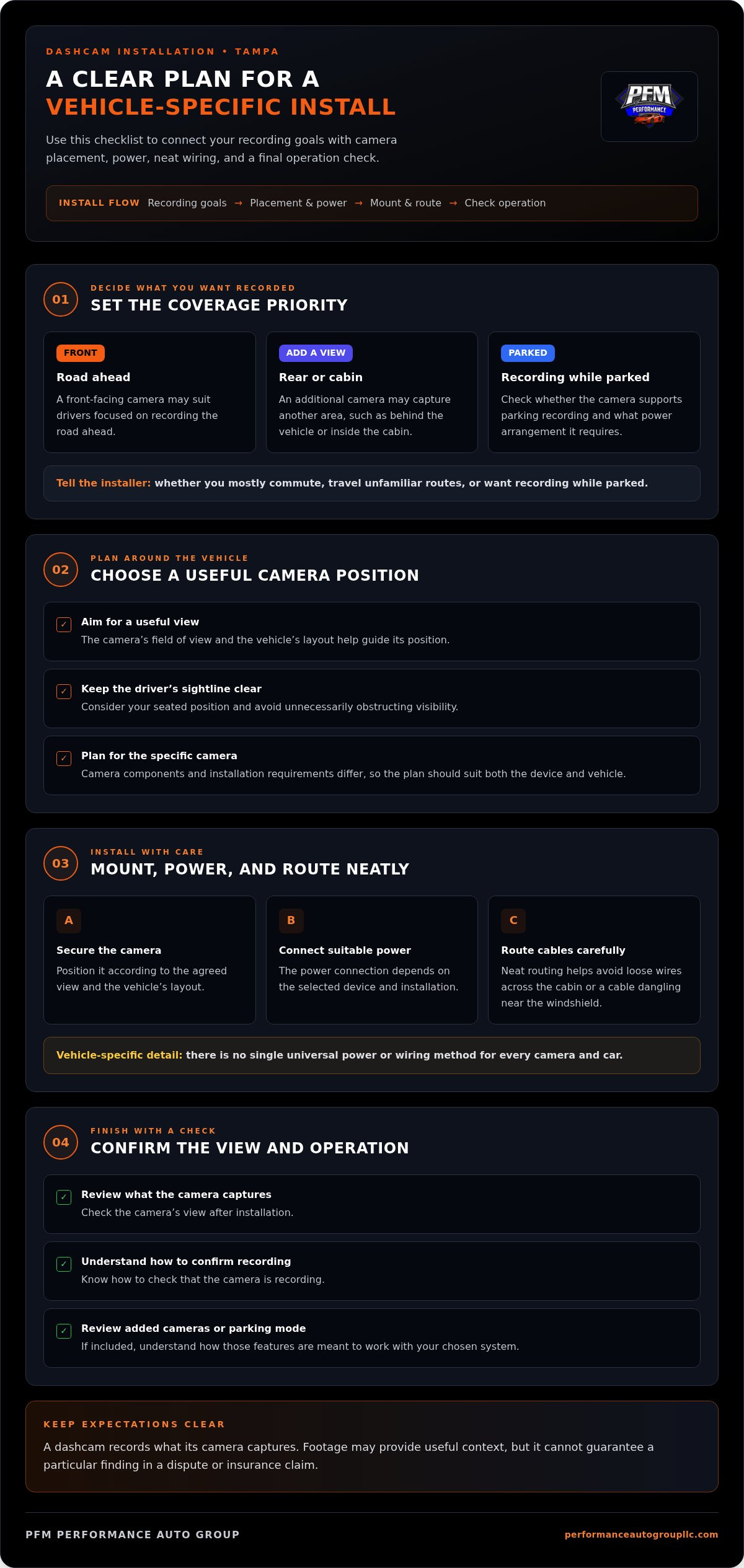
A well-planned installation takes account of your recording goals, the camera’s requirements, and the layout of your vehicle. Dashcam installation for Tampa drivers starts with a discussion about what they want the system to capture, then moves through placement, power, cable routing, and a check of the installed camera. The details vary by camera and vehicle, so the setup should be tailored rather than treated as a one-size-fits-all job.
Before installation, decide whether you want to record the road ahead only or add another camera for a different view. Mention whether parking recording is important, too. These choices help focus the conversation on the features you expect to use and the power arrangement they may require.
In brief: discuss your recording goals, plan placement and power for your vehicle, install and route the system carefully, then check the camera’s view and operation.
From camera goals to a vehicle-specific installation plan
A front-facing camera may suit a driver focused on the road ahead. An additional camera may be appropriate if you want footage from another area, such as behind the vehicle or inside the cabin. The camera’s field of view and the vehicle’s layout help guide positioning. The aim is a useful recording without unnecessarily obstructing visibility. Because devices differ in their components and installation requirements, the plan needs to suit the specific camera and vehicle.
Explain how you expect to use the camera before work begins. For example, say whether you mostly commute, travel unfamiliar routes, or want the system to record while parked. That context helps shape the installation around your intended use rather than simply mounting the camera wherever it fits.
Mounting, power, wiring, and final checks
Once the plan is set, the camera is positioned securely and connected to power in a way that suits the selected device and installation. Cables are routed with care to keep the result neat and appropriate to the vehicle’s interior. There isn’t one universal power or wiring method for every camera and car, so the device’s requirements matter.
After installation, the camera’s view and basic operation should be checked. Make sure you can see what it captures and understand how to confirm that it is recording. If your setup includes more than one camera or a parking-recording feature, learn how those parts are meant to operate with your chosen system.
A clear appointment starts with knowing what you want the camera to do. Note your preferred coverage, bring the camera and its included components if you already own them, and share any parking-recording goals. If you’re ready to plan a vehicle-specific setup with PFM Performance Auto Group, you can book a dashcam installation appointment.
Choosing a dashcam setup for Tampa driving and parking
Choose a camera based on what you want it to record, not on the assumption that more cameras automatically make a better system. A front-facing camera records the view ahead; additional cameras may provide views of other areas, depending on the system. The right configuration for dashcam installation Tampa drivers choose depends on daily driving, parking concerns, and the capabilities of the specific device.
Front-only or multiple-camera coverage: what fits your routine?
A front-only setup may suit someone whose main priority is having a record of the road ahead. If you also want footage from behind the vehicle or inside the cabin, a multi-camera system may better match that goal. Think through the moments you’d most want recorded, then compare the camera’s actual field of view and included components. No setup should be assumed to capture every angle or document every incident.
Keep the decision practical. Additional cameras mean more equipment and installation considerations, so weigh the views you value against the system’s complexity. If you already own a camera, review its documentation to understand which views it records and what components it requires.
| Common priority | Setup consideration |
|---|---|
| Record the road ahead | A front-facing camera may meet this basic coverage goal. |
| Capture additional views | Consider a system with extra cameras, and identify which areas each one records. |
| Record while parked | Check whether the camera supports parking recording and what power arrangement it requires. |
| Keep recording storage manageable | Review the device’s supported storage, capacity, and recording settings in its documentation. |
Driving recordings, parking mode, and Tampa conditions
Recording while driving and recording while parked are different use cases. A camera may record during a trip when powered for driving, while parking recording depends on compatible equipment and an appropriate power setup. Don’t assume the camera will keep recording after you switch off the vehicle. Check the specific device’s instructions and plan the installation around the feature you intend to use.
Power and storage requirements vary by device. Before settling on a setup, look up the camera’s power connection, supported storage, and any settings relevant to parked recording. This gives you a clear basis for discussing installation without making assumptions about compatibility or recording time.
Tampa heat is another reason to follow the camera manufacturer’s operating and care guidance. Avoid relying on generic temperature limits or battery-life estimates, since those depend on the equipment. A vehicle-conscious installation should take account of the selected device’s requirements and your intended use, rather than promise uninterrupted parking coverage.
What Tampa drivers should prepare before dashcam installation
A little preparation makes the installation discussion more focused and helps tailor the finished setup to your routine. Before booking dashcam installation, Tampa drivers can note what they want recorded, gather the camera components they already own, and clear the areas that may affect placement. You don’t need to plan the wiring yourself. Bring the information that helps the installer understand your vehicle and priorities.
A simple pre-installation checklist
Use this checklist to arrive ready for a productive conversation:
- Write down your vehicle’s year, make, and model. These details help frame a vehicle-specific installation discussion.
- Bring the camera and its included components if you own them. Pack the power accessories, memory card, cables, mounting pieces, and instructions that came with the device, if available. Keeping the components together makes it easier to plan the intended setup.
- Clear the likely installation areas. Remove personal items near the windshield, dashboard, or other areas you’d like the installer to consider. This makes it easier to review placement.
- Make a short list of priorities. Note whether you want a front view, additional camera coverage, recording while parked, or a combination. If you’re uncertain, identify the situations you care about most.
If you haven’t chosen a camera yet, bring any product information you’re considering. The model’s instructions can clarify its features and required components, while your notes connect those details to the way you use your car.
Questions to settle before the vehicle is worked on
Think about your main recording goal before arrival. Is your priority footage during everyday drives, coverage while the vehicle is parked, or both? Parking recording depends on the camera and its power requirements, so having that expectation clear helps shape the installation conversation. Also consider where you’d prefer the camera to sit and whether its placement could distract you or affect a clear view.
Be ready to discuss practical trade-offs. A front-facing camera may align with a road-recording priority, while a system with additional cameras may be relevant if you want other views. The equipment you bring and the vehicle’s layout inform the installation plan, so sharing your preferences is more useful than assuming every camera works the same way.
If you’re planning other in-vehicle electronics upgrades alongside a dashcam, PFM Performance Auto Group also handles car audio installation. Keeping related goals in mind can help you describe the overall result you want for your cabin.
With your vehicle details, device components, and recording priorities ready, you can move into the appointment with a clearer plan.
Book dashcam installation with PFM Performance Auto Group in Tampa
Once you’ve settled on the camera coverage and recording priorities that suit your routine, choose an installation team that treats the vehicle with care. PFM Performance Auto Group is a locally owned automotive enhancement shop in Tampa that provides professional dashcam installation as part of its car electronics work. For drivers seeking dashcam installation Tampa, the process brings the camera and vehicle together in a considered installation, rather than treating the job as a generic device sale.
PFM Performance Auto Group was founded in 2004 and focuses on automotive enhancements, including car electronics. A dashcam installation involves more than attaching a camera: placement, power, and cable routing all need to suit the equipment and vehicle. The goal is a practical setup that supports your recording priorities while respecting the cabin’s layout.
What to expect from a local automotive electronics shop
Expect the installation to take account of your vehicle, camera, and intended use. Whether you prioritize the road ahead, additional camera views, or recording while parked, sharing those goals gives the work a clear direction. The approach depends on your device and vehicle, so a tailored plan matters. If you’re also considering an audio upgrade, PFM’s car audio installation service is another part of its automotive electronics work.
Preparation helps you make the most of the appointment. Bring your camera and its included components if you already own a device, and be ready to describe the views you want and how you expect to use its recording features. Those details make the discussion more specific and provide useful context for the installation.
Schedule a dashcam installation appointment in Tampa
Ready to take the next step? Use the appointment page to arrange dashcam installation with PFM Performance Auto Group in Tampa. Have your vehicle’s year, make, and model ready, along with the camera information and a short note about your priorities. This helps you arrive with a clear idea of the setup you want.
Professional installation is a considered way to integrate a dashcam into your vehicle, with attention to camera placement, power, and a tidy finish. PFM serves customers in Tampa and Hillsborough County from its workshop, bringing its automotive electronics work to the process. Choose the setup that fits your routine, then book an appointment to have it installed.
Make your next drive a more considered one
Your camera choice is only part of the decision. The setup should also make sense for the way you’ll use it day to day, from the view you want recorded to how you’ll confirm that the system is working as intended. Before booking dashcam installation Tampa, settle on the priority that matters most to you and bring that goal into the installation conversation.
After installation, make a habit of checking the camera’s recording and storage according to the device’s instructions. Reviewing the controls and settings can help you understand how the system works before you need to access a recording.
Choose a setup that feels practical for your vehicle and routine. A clear plan now can make it easier to get comfortable using your dashcam on the road.
Take the next step with a setup planned around your vehicle and recording priorities.
Frequently Asked Questions
Is it legal to use a dashcam in Florida?
Yes, drivers can use dashcams in Florida, but placement and recording practices matter. Florida law prohibits driving with an object that obstructs the driver’s view, so position the camera where it doesn’t block your sightline. Audio recording raises a separate concern: Florida generally requires consent from all parties to a recorded conversation. If passengers may be recorded, consider disabling audio or clearly informing them. For specific legal advice, consult a qualified attorney.
Can a dashcam record while my car is parked?
Some dashcams can record while parked, but the camera must support that feature and have a suitable power arrangement. For example, a driver who parks on the street overnight may want to explore parking recording, while someone who parks in a private garage may prioritize drive-only recording. Check the device manual for activation, power, and storage requirements, then make sure the planned setup matches how and where you park in Hillsborough County.
Will a dashcam drain my car battery?
It can draw power while the vehicle is off if configured to record while parked, but the effect depends on the camera, connection, and settings. A drive-only setup generally operates differently from one designed to keep recording after you park. Review the device instructions for power-management features and settings, and discuss the camera’s requirements during installation. Don’t assume a particular parking-recording duration or battery impact without device-specific guidance.
How long does dashcam installation take?
Installation time varies with the vehicle, camera, and scope of the setup, so there isn’t one reliable duration for every appointment. A single-camera arrangement may involve different work from a system with additional cameras or parking-recording power needs. Sharing your vehicle details and bringing the camera instructions helps PFM Performance Auto Group plan the installation. Use the appointment page to book your vehicle-specific service.
Should I install a dashcam myself or use a professional installer?
DIY installation may suit a driver comfortable following the camera instructions and managing visible cables. Professional installation is a practical option if you want a cleaner cable route, need help integrating the power connection, or prefer a setup planned around your vehicle. PFM Performance Auto Group provides dashcam installation in Tampa as part of its car electronics work, serving drivers across Hillsborough County.
Where should a dashcam be mounted in a car?
Mount the camera where it can capture the intended view without obstructing your sightline. A position behind the rearview mirror is commonly considered, provided it doesn’t interfere with visibility; a dashboard position may also work if it leaves the driver’s view clear. Check the camera’s instructions for mounting guidance, and consider the windshield, mirror, and driver’s seated position together before fixing the camera in place.
Does a dashcam need Wi-Fi or a cellular connection?
No, a dashcam doesn’t necessarily need Wi-Fi or cellular service to record locally, but features vary by device. Wireless connectivity may support functions such as viewing or transferring footage through a compatible phone app, while cellular-connected features depend on the camera’s design and service requirements. If you mainly want recordings saved on the camera’s storage, review the device specifications to see what works without a network connection before choosing a model.