
How to Hide Dash Cam Wires: A Clean, Safe Installation Guide
A clean dash cam installation isn’t worth it if hiding a wire puts it in the wrong place. If you’re figuring out how to hide dash cam wires, aim for a tidy finish without obstructing your view or pushing cable blindly behind trim where airbags may deploy. A safe route starts with careful planning and vehicle-specific guidance.
Visible wires can make an otherwise polished interior feel unfinished, but the best way to tuck them depends on your vehicle, camera, and power connection. Trim and airbag locations vary, and using a USB outlet, hardwiring kit, or professional installation each involves different considerations.
This guide covers how to plan a discreet cable route, secure wiring without forcing trim, and compare common power options, including what to consider if you want parking mode. You’ll also learn when to stop and consult an installer. For drivers in Tampa and Hillsborough County, PFM Performance Auto Group offers dash cam installation when vehicle-specific routing or wiring feels uncertain. Keep the finish clean, and put safety first.
Key Takeaways
- Learn how to hide dash cam wires with a tidy route that keeps cables away from your view, controls, and airbag deployment areas.
- Use a careful installation sequence: test camera placement, plan the route, secure the cable, connect power, and test the setup.
- Compare tucked wiring, discreet clips, and hardwiring to choose an approach that suits your vehicle and comfort with DIY work.
- Before refitting trim, check that cables are secure and that airbags, pedals, controls, and sightlines remain unobstructed.
- If trim, wiring, or airbag locations are uncertain, consider professional dash cam installation and ask how the installer will protect your vehicle’s trim and safety systems.
How to Hide Dash Cam Wires Without Obstructing Your View
To hide dash cam wires safely, secure the cable along a suitable edge of the windshield and interior. Keep it out of the driver’s sightlines, away from moving controls, and clear of airbag deployment paths. A tidy appearance matters, but not at the expense of visibility or safety. The right route depends on your vehicle’s interior and the camera’s power connection.
A dash cam records the road through a windshield-mounted camera. Readers looking for a basic overview of what is a dash cam can learn more about its purpose and technology. Before moving trim or choosing a power source, check the camera instructions and vehicle manual. Some cable routes are straightforward to secure, while others call for vehicle-specific knowledge.
Where dash cam cables are commonly routed
The cable typically runs from the camera toward an edge of the windshield, then follows a suitable path to its power source. The exact route varies with camera placement, vehicle design, and whether power comes from a USB outlet or a hardwiring connection. Secure the cable so it can’t hang into the driver’s view, snag on clothing, or interfere with pedals, switches, or other controls.
Don’t assume a gap between panels is safe just because the wire fits. Avoid forcing cable into trim or leaving loose sections that could shift while driving. If you can’t identify a safe concealed route, discreet clips may be a better option than pushing the cable into an uncertain space.
Why airbag placement changes the route
Some vehicles have airbags behind trim near the A-pillar or roofline. A cable routed across an airbag’s deployment path could interfere with its operation, so don’t tuck wiring behind these panels unless vehicle and camera guidance confirms a safe route. Airbag locations and trim construction differ between vehicles. A method that works in one model may not be suitable for another.
Consult the vehicle manual and camera instructions before touching trim. If they don’t clearly show a safe cable path, stop rather than guessing or removing unfamiliar panels. A neat finish can wait. A qualified installer can assess vehicle-specific routing and power needs, especially if you’re unsure where an airbag deploys or how to access power without disturbing other systems.
How to Hide Dash Cam Wires Step by Step
A clean installation comes from planning before you tuck or attach anything. Check the dash cam instructions and your vehicle manual first, especially before moving trim or connecting power. The safest route depends on the vehicle’s interior and the camera’s power method. A generic diagram is not a substitute for vehicle-specific guidance.
- 1. Test the camera position. Place the camera where it captures the intended view without interfering with your sightline. Power it temporarily only as directed by the manufacturer, then confirm its position before routing the cable.
- 2. Plan the cable path. Trace the route from the camera to the chosen power source. Check that it avoids airbags, pedals, steering components, sharp edges, and moving controls. The cable should reach the connection without being pulled tight.
- 3. Secure the cable. Use clips or attachment accessories suited to the vehicle’s interior and approved for the camera. If routing beside trim, use only a tool appropriate for those materials and follow vehicle guidance. Don’t force panels open or wedge cable where it could be pinched.
- 4. Connect the power. Follow the camera maker’s instructions for the selected connection, such as a USB outlet or compatible hardwiring setup. If the connection or wiring is unfamiliar, stop rather than guessing.
- 5. Test before finishing. Power on the camera and confirm it operates as expected. Check that the cable stays in place, connectors aren’t under tension, and nothing can fall into the driver’s view or controls.
Leave room for adjustment
Leave enough slack near the camera and connection points for minor repositioning, but avoid loose loops that could snag or drop into the cabin. Keep bends gentle rather than sharp. Before pressing trim back into place, check that the wire isn’t trapped or pulled as the panel settles. If the panel resists, don’t force it.
Dash cam designs and installation requirements vary. Consumer Reports dash cam tests, summarized by Quartz, offer additional context on camera testing and installation considerations. Stop work if you encounter hidden wiring, unexpected resistance, or uncertainty about airbag locations. Drivers in Tampa and Hillsborough County who would rather have an installer assess the route can contact PFM Performance Auto Group about dash cam installation. You can ask about professional dash cam installation if your vehicle’s trim or wiring makes a DIY approach uncertain.
Dash Cam Wire Hiding Methods Compared: Tuck, Clip, or Hardwire
The best way to hide dash cam wires depends on how much concealment you want, how comfortable you are working around your vehicle’s interior, and how the camera gets power. Tucking and clips manage the cable’s path; hardwiring changes how the camera connects to the vehicle. Compare the trade-offs before choosing, and don’t sacrifice a safe route for a seamless look.
| Method | Visibility | Complexity | Reversibility | Vehicle-specific risk |
|---|---|---|---|---|
| Tuck along trim | Low if safely routed | Moderate; depends on trim access | Usually reversible | Higher if airbags or hidden wiring are near the route |
| Use discreet clips | Some cable may show | Low when suitable clips are used | Generally easy to undo | Lower if clips don’t obstruct controls or visibility |
| Hardwire power | Can reduce visible power cable | More involved; electrical connection required | Less simple to reverse | Higher if circuit selection or wiring is incorrect |
This comparison is a guide, not a vehicle-specific installation plan. Trim construction, airbag locations, outlet behavior, and electrical systems vary. For general precautions involved in installing car electronics, review guidance from HowStuffWorks, then confirm details in your vehicle and camera manuals.
When a USB or accessory outlet is the simpler choice
If your camera supports USB or accessory-outlet power, using that connection can avoid working with the vehicle’s wiring. The trade-off is that cable may remain visible near the outlet unless there’s a safe route to conceal it. Check the manuals to learn whether the outlet stays powered when the vehicle is off and what connection the camera requires. Use clips or a tucked path only if they keep the cable clear of airbags and controls.
When hardwiring may be worth considering
A hardwire kit connects the camera to the vehicle’s electrical system and may create a cleaner-looking power route. It must be compatible with the camera and installed using the correct circuit. An unsuitable connection can cause electrical faults or unwanted battery drain. Parking-mode operation isn’t automatic either. It depends on the camera, kit, and vehicle setup.
If you’re unsure how to hide dash cam wires without disturbing trim or selecting a circuit safely, don’t guess. A qualified installer can assess the vehicle-specific route and connection before work begins.
Dash Cam Wiring Safety Checks Before You Refit Trim
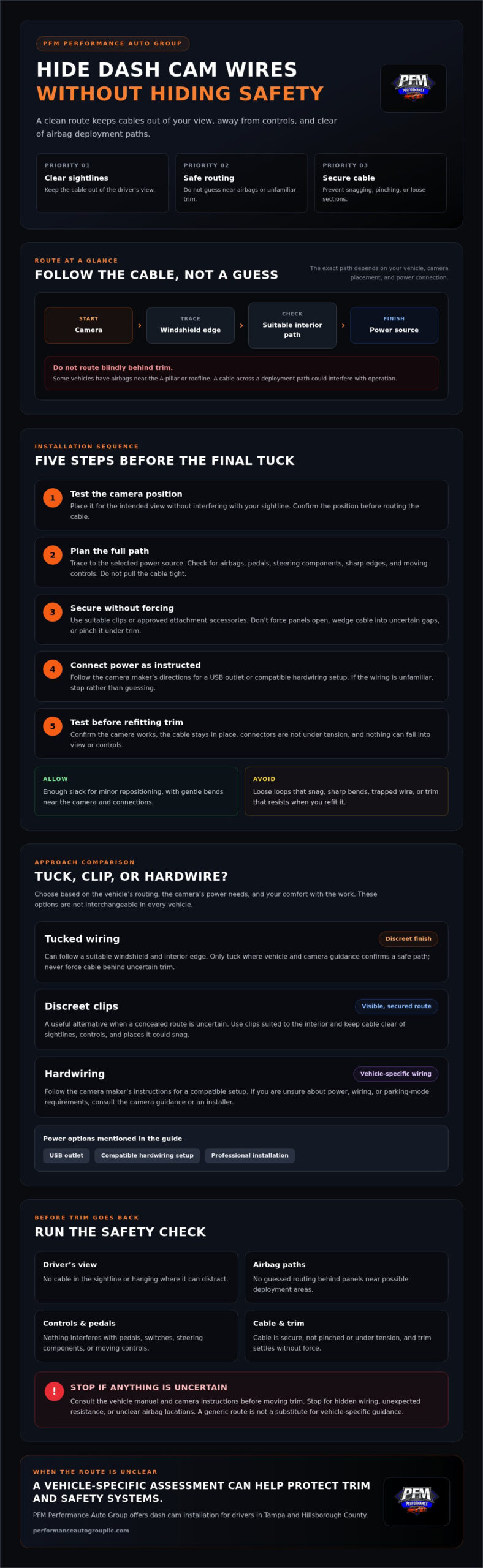
Before pressing trim back into place or driving, inspect the route from end to end. A cable that looks concealed can still be unsafe if it crosses an airbag path, slips toward the pedals, or blocks the driver’s view. Check each of the following while the wiring is still visible and easy to adjust.
Check airbag and trim clearance
- Airbags: Confirm the cable doesn’t cross a known airbag deployment path, including areas behind trim near the roofline or A-pillar. If you can’t confirm the location, leave that area untouched.
- Trim: Check that no wire is caught between panels. Trim should return to position without force; resistance may mean the cable is pinched or the panel isn’t aligned.
- Hidden components: Stop if you encounter unfamiliar wiring, an unexpected obstacle, or a panel that won’t move easily. Don’t pull, cut, or push components aside to make the cable fit.
Check power, visibility, and cable security
- View: Sit in the normal driving position and confirm the camera and cable don’t obstruct your forward sightlines.
- Controls: Make sure wiring can’t fall near the pedals, snag on clothing, or interfere with steering or other controls.
- Security: Confirm the cable is held in place, isn’t sharply bent, and has no loose loops or tension at its connectors.
- Power: Test the camera as directed by its manufacturer and confirm the connection is secure. If accessing a fuse panel or disconnecting the battery is part of the work, consult the vehicle manual first and follow its instructions.
Don’t drive until the camera is secure, the cable is clear of controls, and the installation passes these checks. Stop and seek qualified help if trim removal feels uncertain, an airbag location is unclear, wiring doesn’t match the instructions, or the camera behaves unexpectedly after connection. A clean finish isn’t worth risking vehicle damage or compromising a safety system.
If you’re unsure about the route or power connection, PFM Performance Auto Group offers dash cam installation for drivers in Tampa and Hillsborough County. Ask about professional dash cam installation.
When to Choose Professional Dash Cam Installation in Tampa
DIY installation may be manageable when the power connection and cable path are clear. Consider professional help if trim is difficult to remove, you encounter unfamiliar wiring, or you can’t identify a safe route around an airbag. Hardwiring can also call for vehicle-specific knowledge, particularly if you’re unsure which circuit is appropriate. Stop before uncertainty turns into damage or a compromised safety system.
PFM Performance Auto Group is a locally owned automotive enhancement shop serving Tampa and Hillsborough County, and it offers dash cam installation. Before arranging an installation, ask how the proposed cable route will avoid airbags and moving controls while minimizing loose, visible wiring. A clear explanation helps you understand the plan for your vehicle instead of relying on a one-size-fits-all approach.
Questions to ask before booking a dash cam installation
- How will you route and secure the cable? Ask how the plan keeps wiring clear of airbag deployment paths, pedals, steering controls, and the driver’s view.
- What information do you need? Be ready to share the vehicle’s make, model, and year, along with the dash cam details and whether you’re considering outlet power or hardwiring. Confirm what information the installer needs in advance.
- What does the installation involve? Clarify the expected scope and any vehicle-specific considerations before work begins, including whether trim needs to be moved and how the power connection will be handled.
These questions are useful whether you’re deciding how to hide dash cam wires yourself or comparing professional options. Look for a careful, vehicle-specific explanation, and ask for clarification if you don’t understand how the proposed route protects trim and safety systems.
Book dash cam installation in the Tampa area
If a clean DIY route remains uncertain, professional installation is a practical alternative. PFM also provides car audio installation, reflecting its work with vehicle electronics. Before booking dash cam installation, confirm current appointment availability and discuss your camera, vehicle, and preferred power method. This helps establish the expected scope without assuming every vehicle requires the same approach.
Finish with a Clean, Safety-First Installation
Learning how to hide dash cam wires is about more than tucking cable out of sight. Plan the route before attaching anything, choose a power method that suits your camera and vehicle, and check that wiring stays clear of the driver’s view, controls, and airbag paths. If trim, wiring, or airbag locations are uncertain, pause rather than risk a rushed installation.
A careful final check helps protect the vehicle’s interior and support reliable camera operation. For drivers in Tampa and Hillsborough County, PFM Performance Auto Group offers dash cam installation, along with car audio and electronics installation. If a professional assessment feels like the right next step, share your vehicle and camera details when arranging an appointment.
Choose the route that keeps safety first and gives your camera a secure, tidy finish. If you’re in Hillsborough County and want help with the installation, book a dash cam installation appointment with PFM Performance Auto Group.
Frequently Asked Questions
How do you hide dash cam wires without removing trim?
You can route dash cam wiring along an existing interior edge or secure it with clips suited to the vehicle’s surfaces. To learn how to hide dash cam wires without removing trim, check that the cable stays clear of your view, pedals, and controls. Don’t force it into a gap or route it near an airbag. If you can’t confirm a safe path, leave the cable visible and ask an installer.
Can I tuck dash cam wires behind the A-pillar?
Only tuck a cable behind the A-pillar if your vehicle’s design and airbag layout allow a safe route. Safety equipment may be behind pillar trim, and routing advice for another vehicle may not apply to yours. Check the owner’s manual and camera instructions, and don’t place wiring across an airbag deployment path. If you can’t confirm clearance, avoid removing the trim and consult a qualified installer.
Is it safe to hardwire a dash cam myself?
Hardwiring may be suitable for an experienced DIYer, but it depends on the vehicle and camera requirements. The work involves choosing an appropriate circuit and making secure electrical connections. Mistakes can cause faults or drain the battery. Follow the camera manufacturer’s instructions and vehicle guidance. If fuse selection or electrical work is unfamiliar, don’t guess. Having a qualified installer assess the connection is the safer option.
Should dash cam wires connect to USB or the fuse box?
Choose USB or an accessory outlet if it meets your camera’s power requirements and you’re comfortable with a potentially visible cable. A fuse-box connection may conceal more of the power wiring, but it requires the correct circuit and careful installation. Check your vehicle and camera manuals before choosing. Also confirm how the outlet behaves when the vehicle is off and whether your preferred setup supports the camera’s intended operation while parked.
How do I hide rear dash cam wires in an SUV?
Plan the rear-camera cable route around the SUV’s trim and hatch or liftgate, keeping it away from moving parts and places where it could be pinched when the hatch closes. Use an existing route only if it’s suitable for the cable and vehicle. Don’t force trim or disturb unfamiliar wiring. If the path crosses panels you can’t identify confidently, an installer can assess the vehicle-specific route before you proceed.
Can dash cam wires interfere with airbags?
Yes, wiring can create a safety concern if it crosses an airbag deployment path or is concealed behind trim in an unsuitable location. Airbag placement varies by vehicle, so a route that appears suitable in another model may not be safe for yours. Check the owner’s manual before routing cable or moving trim. If the airbag location or safe path is unclear, leave the area untouched and seek qualified help.
When should I have a dash cam professionally installed?
Consider professional installation if you need hardwiring, face unfamiliar trim, or can’t confirm a safe route around airbags. It’s also a practical option if you want a discreet, secured setup without risking damage to interior panels. Ask about the planned cable route, power connection, and vehicle-specific considerations before work begins. In Hillsborough County, PFM Performance Auto Group offers dash cam installation. Confirm appointment availability directly with the shop.