
Android Auto Upgrade for Older Cars: A 2026 Buying Guide
The most obvious Android Auto upgrade for older cars is replacing the factory stereo, but that isn’t always the best fit. Your existing screen, steering-wheel controls, backup camera, and other dashboard features can affect which retrofit works well. Choosing by screen size alone can leave you with an upgrade that doesn’t integrate smoothly with the rest of your vehicle.
The right approach depends on your car’s equipment and how you drive. This guide compares replacement head units, modules that add functionality to a factory screen, and portable displays. It also explains what to consider before choosing and how Android Auto differs from a standalone Android head unit.
You’ll learn how to plan around useful factory features and what a vehicle-specific installation in Hillsborough County can involve. PFM Performance Auto Group installs car audio and electronics, including Android Auto integration, with attention to your vehicle’s existing setup. Use the criteria below to choose an upgrade that suits your dashboard and daily routine.
Key Takeaways
- An Android Auto upgrade for older cars starts with your vehicle’s existing stereo and the features you want to keep.
- Compare replacement head units, factory-screen modules, and portable displays to find the approach that suits your dashboard and daily driving.
- Factory controls, cameras, and other functions may be retained differently depending on the vehicle and chosen equipment.
- Gather your car’s make, model, year, stereo details, and feature priorities before planning an installation.
- A vehicle-specific installation in Hillsborough County can account for fit, connections, and the factory features you rely on.
Can an Older Car Get Android Auto? Start With the Upgrade Options
Yes, many older vehicles can be upgraded to use Android Auto. The right route depends on the car’s stereo, display, and other equipment. A compatible phone alone isn’t enough: the factory receiver must support Android Auto, or the vehicle needs additional equipment that provides a compatible interface.
Android Auto lets you access supported phone features through a compatible vehicle display and controls. It projects selected apps from your phone; it doesn’t replace your phone’s operating system or reprogram the car’s computer. In short, an Android Auto upgrade connects supported phone features to a vehicle interface; a phone mount simply holds the phone where you can see it. For a broader overview of the technology, see What is Android Auto?
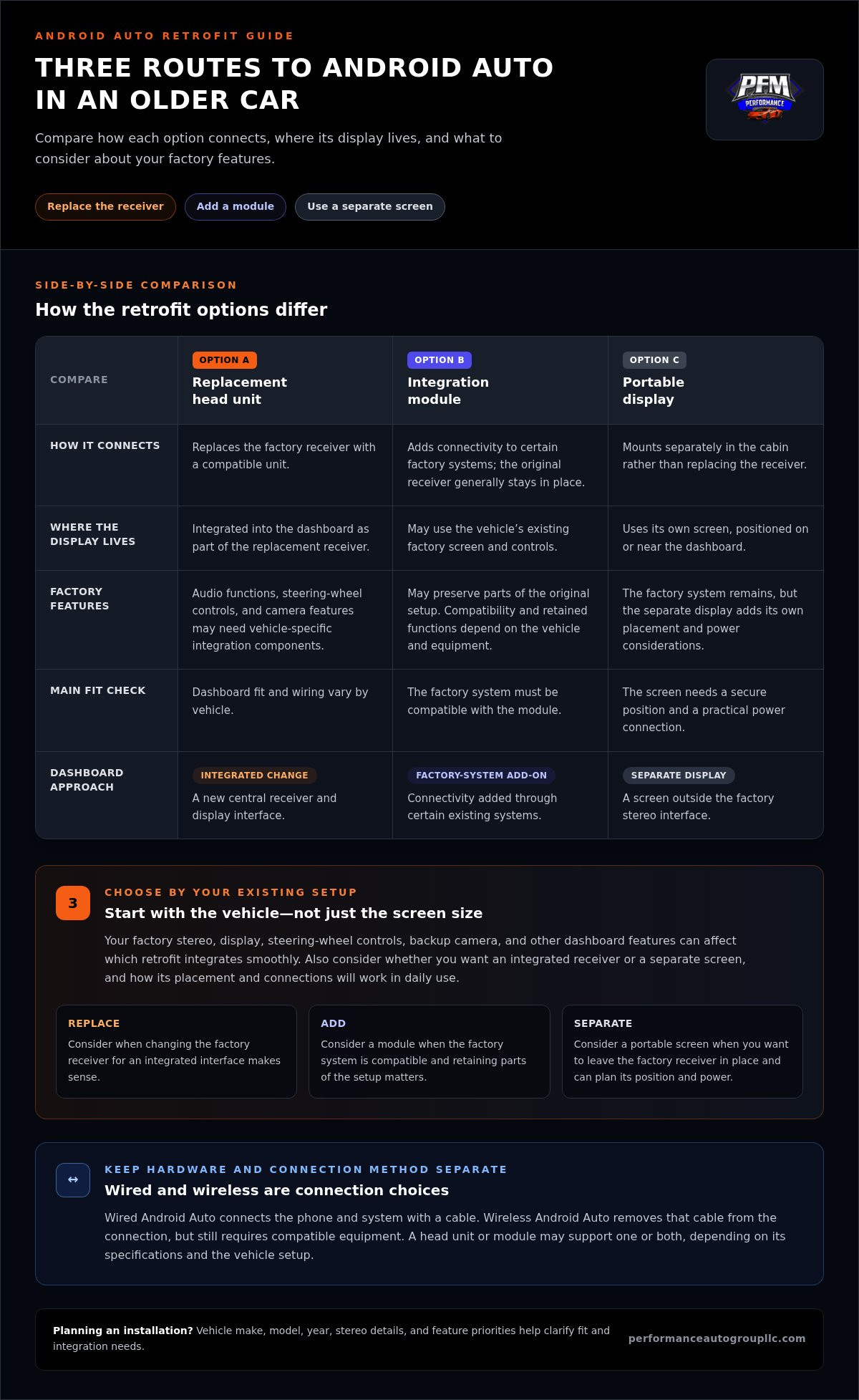
An Android Auto upgrade for older cars generally follows one of three paths: replace the factory receiver with a compatible head unit, add an integration module to a compatible factory system, or use a separate portable display. Each approach has different fit and integration considerations, so start with your dashboard and equipment rather than assuming one option suits every car.
What does an Android Auto upgrade add to an older car?
Depending on the phone, software, vehicle, and installed equipment, Android Auto can bring compatible navigation, calling, messaging, and audio functions to the vehicle interface. You can access supported functions through the connected system instead of handling every task on your phone screen. The display and controls depend on the retrofit, and not every app or feature is necessarily available through the car.
This isn’t the same as installing a new operating system in the vehicle. Your phone remains the source of the projected apps, while the compatible receiver or display provides the in-car interface. That distinction helps you tell an Android Auto receiver apart from a standalone Android head unit, which is a different type of device.
Which retrofit approaches are available?
First decide how much of the current setup you want to change. A replacement receiver creates a new central interface, while a module may add connectivity through an existing factory display. A portable screen gives you a separate display without replacing the receiver, but it needs a secure position and a practical power connection.
- Replacement head unit: Replaces the factory receiver with one that supports Android Auto. It can suit a car where replacing the stereo makes sense, though vehicle-specific integration may be needed to retain existing controls or other features.
- Integration module: Adds smartphone connectivity to certain factory systems and may preserve parts of the original setup. Compatibility depends on the vehicle and system.
- Portable display: Mounts separately on the dashboard rather than becoming part of the factory stereo. It avoids receiver replacement, but screen placement, wiring, and power become part of everyday use.
Start with the vehicle, not the screen you like best. The receiver, factory features, and your preference for an integrated or separate display all shape which upgrade is likely to feel natural in daily use.
How Each Android Auto Retrofit Works: Head Unit, Module, or Portable Display
These three retrofit routes connect to your car in different ways and create different dashboard experiences. A replacement receiver changes the factory stereo, an integration module works with certain factory systems, and a portable display sits separately in the cabin. Compare installation approach, screen placement, and factory-feature considerations to narrow down an Android Auto upgrade for older cars.
| Retrofit option | Installation approach | Display integration | Factory-feature considerations |
|---|---|---|---|
| Replacement head unit | Removes the factory receiver and installs a compatible replacement. Dashboard fit and wiring vary by vehicle. | Provides an integrated receiver and display interface in the dashboard. | Existing audio functions, steering-wheel controls, and camera features may require vehicle-specific integration components. |
| Integration module | Adds connectivity to certain factory systems, with the original receiver generally remaining in place. | May use the vehicle’s existing factory screen and controls. | Can suit drivers aiming to retain more of the original setup, but compatibility and retained functions depend on the vehicle and equipment. |
| Portable display | Mounts separately in the cabin rather than replacing or modifying the factory receiver in the same way. | Uses its own screen, positioned on or near the dashboard. | The factory system remains, but the separate screen needs a secure position and a practical power connection. |
Wired and wireless Android Auto are connection methods, not separate retrofit hardware categories. A compatible head unit or module may support one or both, depending on its specifications and the vehicle setup. Wired use connects the phone and system with a cable. Wireless use removes that cable from the connection, but still requires compatible equipment. Choose the connection method that suits your routine, then assess the retrofit hardware separately.
When does replacing the factory head unit make sense?
A replacement may be appropriate when you want a newer receiver with an integrated screen, or when the original stereo limits the upgrade path. The installation plan depends on the dashboard opening, wiring, and vehicle-specific fit. Before choosing this route, account for factory audio functions, steering-wheel controls, and camera operation. Retaining them can require additional integration equipment, and the result varies by vehicle.
Fit matters as much as the display. A clean installation accounts for how the receiver sits in the dashboard and how its connections work with the car’s existing electronics. PFM Performance Auto Group’s car audio installation includes professional electronics installation tailored to the vehicle’s setup.
When are an integration module or portable display worth comparing?
Consider an integration module if keeping more of the factory system is a priority and your vehicle supports that approach. A portable display may suit you if you prefer not to replace the receiver. Its separate mounting position, visible wiring, and power connection can make it feel less integrated, so think about whether that setup will be comfortable to use every day.
If you’re weighing phone-platform options as well as hardware, compare this guide with our Apple CarPlay installation guide. For a vehicle-specific installation, you can schedule an appointment.
Will an Android Auto Upgrade Keep Your Car’s Factory Features?
It may, but feature retention depends on the vehicle and the equipment selected. Some upgrades work through the factory receiver, while others replace it. In either case, the car’s wiring, electronics, and original system design affect what can be preserved. Retrofit compatibility is vehicle-specific, not universal, because the same upgrade can interact differently with different factory systems.
Keeping the original receiver may preserve its familiar interface and some built-in functions, but it can limit your choices if that system doesn’t support the desired integration. Replacing it can provide a newer receiver and display, though keeping existing features may call for vehicle-specific adapters or other integration equipment. Neither route guarantees that every original function will carry over unchanged.
Which factory features need special attention?
Before choosing an upgrade, list the features you rely on. Steering-wheel audio controls, a factory amplifier, and a backup camera can involve different connections or compatibility requirements. Some vehicles also put climate settings or vehicle information on the factory screen, so replacing the receiver may affect more than audio and navigation.
- Steering-wheel controls: Check whether the chosen setup can communicate with the car’s control wiring.
- Factory amplifier: Note whether the existing system uses an amplifier and how the receiver connects to it.
- Backup camera: Identify how the camera connects and whether the replacement system supports that input.
- Dashboard screen: Look for climate or vehicle settings accessed through the original display, since these may require specific integration.
Use these as points for an equipment-specific compatibility assessment, not features to assume will transfer automatically. A portable display generally leaves the factory receiver in place, for example, but that doesn’t mean it integrates with the car’s original controls or shows the same information as an in-dash system.
What can affect sound, controls, and screen integration?
Connections matter. Factory wiring and connectors may differ from those used by an aftermarket receiver, and an existing amplifier can affect how audio signals connect. The vehicle’s configuration and the integration equipment chosen determine the result. Planning for these factors before installation helps prevent overlooking a feature you rely on.
Physical fit also deserves attention. The dashboard opening determines what receiver can fit, while the dashboard’s shape and trim affect how a new screen sits. A portable display has different needs: it requires a stable, usable mounting position and a practical power connection. Before settling on a design, consider the screen’s position in relation to your sightlines and access to existing controls.
For an Android Auto upgrade for older cars, write down your vehicle’s make, model, year, current receiver, and the factory features you want to keep. That information gives an installer a practical basis for assessing fit and integration instead of treating the upgrade as a one-size-fits-all swap.
How to Prepare for an Android Auto Installation in an Older Car
Preparation makes it easier to plan an Android Auto installation around your car and daily driving. Gather clear details about the vehicle, its current stereo, and the factory features you rely on. This gives the installation conversation a practical starting point, whether your priorities are navigation, hands-free calls, audio, or familiar controls.
What vehicle and phone details should you gather?
Use this sequence to organize the details before planning an Android Auto upgrade for older cars:
- Record the vehicle: Write down its make, model, year, and trim. Similar vehicles can have different dashboard or electronics configurations.
- Describe the current stereo: Note whether it’s a factory receiver, an existing aftermarket unit, or a system with a separate display. A clear dashboard photo can help show the layout.
- List the features you use: Include steering-wheel audio controls, a factory amplifier, backup-camera display, and any climate or vehicle settings shown through the stereo.
- Set your priorities: Decide which functions matter most, such as navigation, hands-free calls, audio access, or familiar controls. Consider whether you prefer an integrated dashboard screen or a separate display.
- Check phone readiness: Note your phone model and software version, then compare them with Google’s current official Android Auto requirements. Requirements can change, so use current guidance rather than an old checklist.
Keep these notes together. A clear description of your existing setup and desired experience makes it easier to discuss a suitable installation path.
What should drivers expect from an installation consultation?
A vehicle-focused consultation considers the dashboard, existing electronics, factory functions, and how you want to use Android Auto. PFM Performance Auto Group tailors professional car electronics installation to your vehicle and requested integration rather than treating every car as a standard stereo swap. Planning this way helps identify fitment and connection considerations before installation.
For Tampa-area drivers and others in Hillsborough County, the same preparation is useful. Share your vehicle details and feature list, then discuss how the system should fit into your routine. PFM’s car audio and electronics services include Android Auto integration and professional installation.
Arrive with your priorities in hand. A clear starting point supports a focused conversation about screen placement, factory features, and the connection experience you want.
Android Auto Installation in Hillsborough County: Choose a Vehicle-Fit Upgrade
The right retrofit isn’t simply the one with the largest display or newest features. It’s the one that fits your dashboard, works with the factory functions you value, and feels practical on everyday drives. A replacement head unit, integration module, or portable display can each make sense, depending on your car’s configuration and how integrated you want the experience to be.
For an Android Auto upgrade for older cars, consider these details before selecting equipment. A factory screen that also handles vehicle settings calls for a different plan than a basic factory stereo. A driver who wants an in-dash interface may also have different priorities from someone who prefers a separate display and minimal changes to the receiver.
Why a vehicle-specific installation plan matters
Vehicle-specific planning connects the car’s existing electronics, the factory features you want to retain, and the way you expect to use Android Auto. Steering-wheel controls, an amplifier, or a backup-camera display may affect the integration approach. Dashboard dimensions and wiring shape what can be installed cleanly. A thoughtful assessment addresses these fitment and connection details rather than treating the job as a universal receiver swap.
PFM Performance Auto Group is a locally owned shop serving Hillsborough County, including Tampa-area drivers, with professional car audio and electronics installation. The shop installs Android Auto integrations as vehicle-specific upgrades. Its car audio and electronics services can help connect new features with your existing setup.
Before choosing a route, weigh the trade-offs in everyday driving. Do you want a screen that feels integrated into the dashboard? Are there factory controls or displays you rely on? Would a separate screen suit your routine, or would it create extra clutter? Clear priorities help guide the choice and keep the finished system aligned with how you use your car.
Book an Android Auto upgrade appointment
Bring the essentials to the installation conversation: your vehicle’s make, model, year, and trim; a description or photo of the current stereo and dashboard; and a short list of features you want to keep. Include your main goals, such as navigation, hands-free calls, audio access, or familiar controls. Your phone model and software details can also help frame questions about using Android Auto.
This information gives the team a useful starting point for discussing fit, integration, and the upgrade approach that matches your car. For Hillsborough County drivers, professional installation can account for the vehicle’s existing equipment while building toward a more convenient daily experience.
Make Your Next Drive Feel More Connected
The best Android Auto upgrade for older cars should feel like a considered improvement to a vehicle you already know, not a compromise you have to work around. Think beyond the initial installation: a well-matched setup can support how you navigate, take calls, and enjoy audio. Keep your priorities clear and let the car’s existing configuration guide the next step.
PFM Performance Auto Group provides professional car audio and electronics installation in Hillsborough County, including Android Auto integration. As a locally owned business, the team approaches each upgrade with attention to the vehicle and the experience you want. Bring your car details and feature priorities, then plan a system that suits your daily drive.
With the right equipment and a vehicle-specific installation, your older car can offer a more connected drive.
Frequently Asked Questions
Can I add Android Auto to a car that did not come with it?
Yes, an older car can often gain Android Auto through compatible retrofit equipment. An Android Auto upgrade for older cars may use a replacement receiver, an integration module, or a separate display, depending on the vehicle’s existing electronics. A car with a basic factory stereo, for example, may call for a different solution than one with an original touchscreen. The vehicle’s configuration determines the right path.
Can I get Android Auto without replacing my car’s factory radio?
Yes, in some vehicles. An integration module may add Android Auto through a compatible factory system, while a portable display provides a separate screen and leaves the original radio in place. These approaches don’t work with every factory receiver and can differ in how audio is heard or controlled. Consider how you currently use radio, media inputs, and dashboard controls before choosing a setup.
Is wireless Android Auto possible in an older car?
Yes, wireless Android Auto can be possible if the retrofit equipment and phone support that connection method. A car’s age alone doesn’t determine wireless capability; the installed receiver, module, or display matters. Some setups require a wired connection instead. Before selecting equipment, compare its connection specifications with your phone’s current compatibility requirements so you know what to expect in daily use.
Will an Android Auto upgrade keep my steering-wheel controls and backup camera?
Possibly, but it depends on the vehicle and equipment. A steering-wheel control signal or camera connection, for example, may need a compatible interface to work with a replacement receiver. Before installation, note how each feature currently behaves and which factory controls you rely on. After the upgrade, test those functions individually, including camera display and audio controls, rather than assuming they operate as before.
How much does an Android Auto upgrade for an older car cost?
The total varies with the retrofit approach, vehicle fitment, and how the system connects to existing equipment. A useful budget should account for the receiver or display, any vehicle-specific integration components, and installation work. Replacing the factory radio may involve different parts and labor from using an existing screen. Compare the full installation scope, not just the price of a screen or receiver.
Does Android Auto work with every Android phone?
No. Compatibility depends on the phone’s hardware, Android software, and the connection method supported by the installed system. A phone that can run Android apps may still not meet Android Auto’s current requirements. Check Google’s official Android Auto guidance for current device and software information, and confirm that your phone supports the wired or wireless connection you plan to use.
Can I use Google Maps through an Android Auto retrofit?
Yes, Google Maps can be available through a compatible Android Auto setup when the phone, app, software, and installed equipment support it. The map interface appears through the connected vehicle display; the car’s computer doesn’t become a phone. For a smoother first drive, set up your phone and confirm the connection while parked. Drivers in Hillsborough County can plan routes before heading out.